
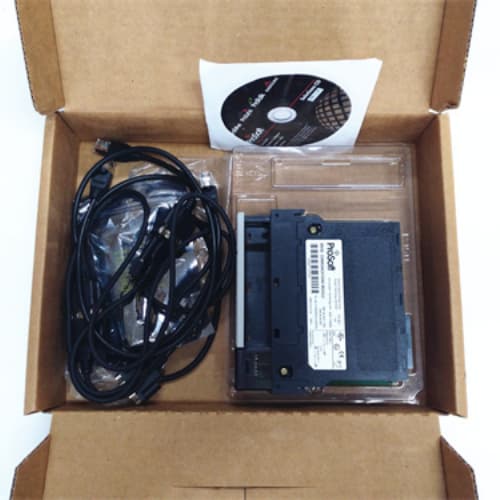
Description
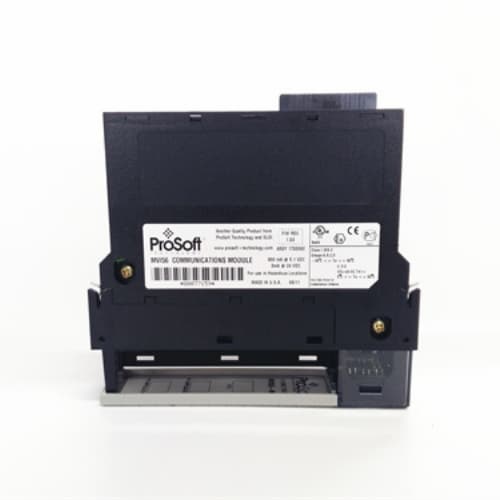
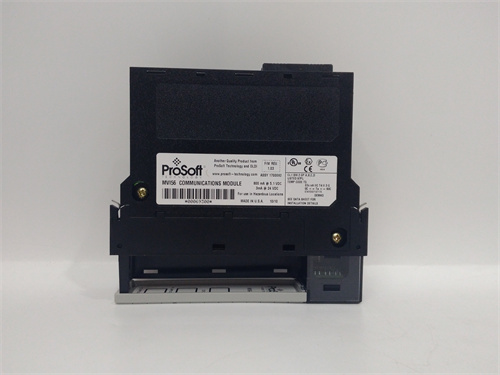
Product Parameters
| Parameter | Specification |
|---|---|
| Model | MVI56-MCM |
| Brand | ProSoft Technology (Belden) |
| Platform | Allen-Bradley ControlLogix |
| Function | Modbus serial communication module |
| Chassis Slots | 1 slot |
| Serial Ports | 2 independent ports (RS-232 / RS-422 / RS-485) |
| Protocol Support | Modbus RTU and Modbus ASCII, Master or Slave per port |
| Backplane Interface | ControlLogix backplane, tag-based data exchange |
| Data Capacity | Up to 10,000 16-bit registers |
| Diagnostics | LED indicators, status registers, ProSoft diagnostics |
| Configuration Tool | ProSoft Configuration Builder (PCB) |
| Operating Temperature | Industrial range |
| Design Intent | Modbus serial device integration into ControlLogix |
Advantages and Features
The ProSoft MVI56-MCM provides two fully independent serial ports, each configurable as Modbus Master or Slave, allowing simultaneous connection to multiple Modbus networks with different baud rates and protocols. The MVI56-MCM supports up to 10,000 16-bit registers of Modbus data exchange, with flexible data mapping to ControlLogix tags through the backplane. The module’s diagnostic LEDs and status data provide clear visibility into communication health, and ProSoft Configuration Builder software simplifies setup and troubleshooting. The MVI56-MCM is field-proven in thousands of installations, with a stable firmware baseline and broad compatibility with existing ControlLogix programs. For sites already using the MVI56-MCM, the module remains fully supportable, and its compatibility with the enhanced MVI56E-MCM provides a clear upgrade path when additional diagnostics or web server features are required.
Application Cases and Fields
The ProSoft MVI56-MCM is commonly applied in:
-
Oil and gas facilities integrating Modbus flow computers, RTUs, and drives
-
Water and wastewater plants connecting Modbus meters, analyzers, and pump controllers
-
Manufacturing lines interfacing Modbus VFDs, servo drives, and power meters
-
Power generation and utility substations linking Modbus protection relays and meters
-
Legacy system maintenance projects preserving existing Modbus serial networks
In these applications, the MVI56-MCM performs Modbus polling and data concentration, presenting clean tag data to the ControlLogix controller for use in control and SCADA logic.
Comparison with Competing Products
Compared with fixed-function Modbus modules, the ProSoft MVI56-MCM offers dual independent ports and flexible Master/Slave configuration per port, providing greater flexibility for multi-network installations. Competing Modbus gateways typically require external hardware and separate power supplies, whereas the MVI56-MCM installs directly in the ControlLogix chassis and exchanges data over the backplane without external wiring. Against the enhanced MVI56E-MCM, the MVI56-MCM lacks the on-board web server and removable Compact Flash storage but remains fully functional and cost-effective for existing installations. For new deployments, the MVI56E-MCM is generally preferred, while the MVI56-MCM remains the standard choice for sustaining existing Modbus serial networks.
Selection Suggestions and Precautions
-
Confirm the ControlLogix chassis, firmware revision, and ProSoft module compatibility before specifying the MVI56-MCM.
-
Verify the serial interface type (RS-232, RS-422, or RS-485) and termination requirements for each Modbus network.
-
Plan Modbus register mapping and ControlLogix tag structures in advance to streamline commissioning.
-
Follow ProSoft installation and configuration manuals and observe ESD precautions when inserting the MVI56-MCM into the chassis.
-
Procure the ProSoft MVI56-MCM through authorized channels to ensure authenticity and access to firmware and support.
-
Document register mappings and network settings, and maintain configuration backups for rapid recovery.
-
When replacing a MVI56-MCM with an MVI56E-MCM, verify program compatibility and update tag mappings as required by the enhanced module’s data structure.
-
Test Modbus polling rates and timeouts in a staging environment to confirm network performance before production deployment.




Reviews
There are no reviews yet.