
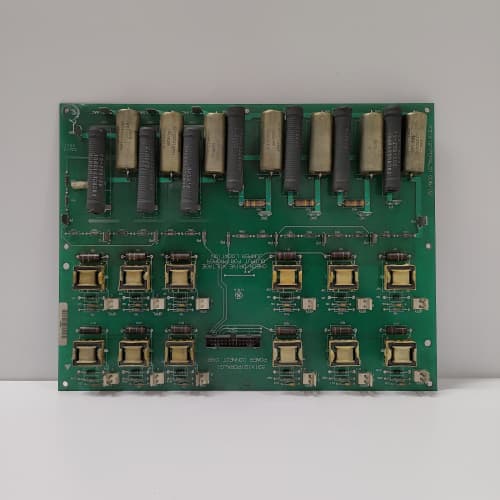
Description
Technical Parameters
-
Product Type: Fieldbus / network communication interface board
-
Supported protocols: Profibus-DP (DP-V0/V1), DeviceNet, CANopen – selectable via firmware configuration
-
Physical interface: 9-pin D-sub (Profibus) or 5-pin terminal block (DeviceNet/CANopen)
-
Data exchange: Dual-port RAM (DPM) – 256 bytes input / 256 bytes output (expandable)
-
Baud rates: Profibus: 9.6 kbps – 12 Mbps; DeviceNet: 125–500 kbps; CANopen: 10 kbps – 1 Mbps
-
Isolation: 2500 Vrms between network and drive logic
-
Diagnostic features: Network status LED, bus error counters, and extended fault logging
-
Connectors: One 26-pin header to regulator board; one 9-pin D-sub (Profibus); one 5-pin terminal block (DeviceNet/CANopen)
-
Mounting: 4× M4 holes (standard GE rack footprint)
-
Power supply: +5 VDC from regulator board (250 mA max)
-
LED indicators: Power, Network Status (NS), Module Status (MS), and TX/RX activity
Advantages & Features
-
Multi-protocol support – Profibus-DP, DeviceNet, or CANopen on the same board; GE 531X158FFDADG1 adapts to existing plant networks without purchasing separate cards
-
Dual-port memory – Faster data exchange with the regulator board reduces network scan time and improves drive response
-
High-speed communication – Up to 12 Mbps (Profibus) for large distributed control systems
-
Enhanced diagnostics – Extended fault logging and bus error counters simplify troubleshooting of network issues
-
Galvanic isolation – 2500 Vrms protects regulator board from network transients and ground potential differences
-
Diagnostic LEDs – NS and MS LEDs provide rapid network and module status per Profibus/DeviceNet standards
-
Plug-and-play – Pin-compatible with earlier FFD revisions; firmware upgradeable
Application Cases
-
Large distributed control systems – Automotive assembly line with 50+ AC-300 drives integrated via Profibus-DP; GE 531X158FFDADG1 provided fast data exchange (12 Mbps) for coordinated motion control
-
DeviceNet retrofit – Water treatment plant replaced failed DeviceNet interface cards with GE 531X158FFDADG1; the board maintained compatibility with existing DeviceNet scanner
-
CANopen servo integration – Packaging machine used GE 531X158FFDADG1 to connect AC-300 drives to CANopen-based PLC for high-speed servo positioning
Competitive Comparison
| Aspect | GE 531X158FFDADG1 (OEM) | Generic Aftermarket Fieldbus Card |
|---|---|---|
| Protocol support | Profibus, DeviceNet, CANopen | Usually one fixed protocol |
| Data exchange | Dual-port memory (fast) | Serial or slower bus |
| Max baud rate | 12 Mbps (Profibus) | 1.5 Mbps typical (Profibus) |
| Diagnostics | Extended logging + counters | Basic status LED only |
| Isolation | 2500 Vrms | 500–1500 Vrms typical |
| Firmware upgradability | Yes | Rarely |
Selection Suggestions
-
Verify your plant network protocol (Profibus-DP, DeviceNet, or CANopen) – GE 531X158FFDADG1 supports all but requires correct firmware configuration
-
Confirm baud rate and node address – configure via drive parameters or DIP switches (depending on protocol)
-
Check regulator board compatibility – works with 531X111, 531X139, and 531X305 series (minimum firmware version required – consult drive manual)
-
For Profibus networks, use Profibus-certified cables and connectors – improper termination causes communication errors
-
Prefer remanufactured units with updated firmware for the latest protocol revisions
Precautions
-
Always disconnect power before handling GE 531X158FFDADG1 – network cables may carry external voltages
-
For Profibus, ensure proper bus termination (active termination at both ends) – missing termination causes signal reflection and errors
-
DeviceNet requires an external 24V power supply for the network – do not power the network from the drive
-
CANopen requires 120Ω termination resistors at both ends of the bus
-
When replacing, transfer the node address and baud rate settings to the new GE 531X158FFDADG1
-
Use shielded twisted-pair cables for all network types – unshielded cables cause communication failures
-
Torque mounting screws to 2–3 N·m – over-tightening cracks the PCB
-
If the NS LED is red, check the network cable continuity and termination first – most faults are cabling-related
-
Do not hot-swap network cables – this may damage the isolation circuitry on GE 531X158FFDADG1
-
For Profibus, verify GSD file compatibility with your PLC – the board may require the correct GSD file for proper data mapping
A-B 1756-CNB
A-B 1794-OE12
A-B 1764-LRP
Schneider 140XBP00600
.jpg)



Reviews
There are no reviews yet.